Huanuo DS7 High-Performance Dual Monitor Arm Review – Built for Stability
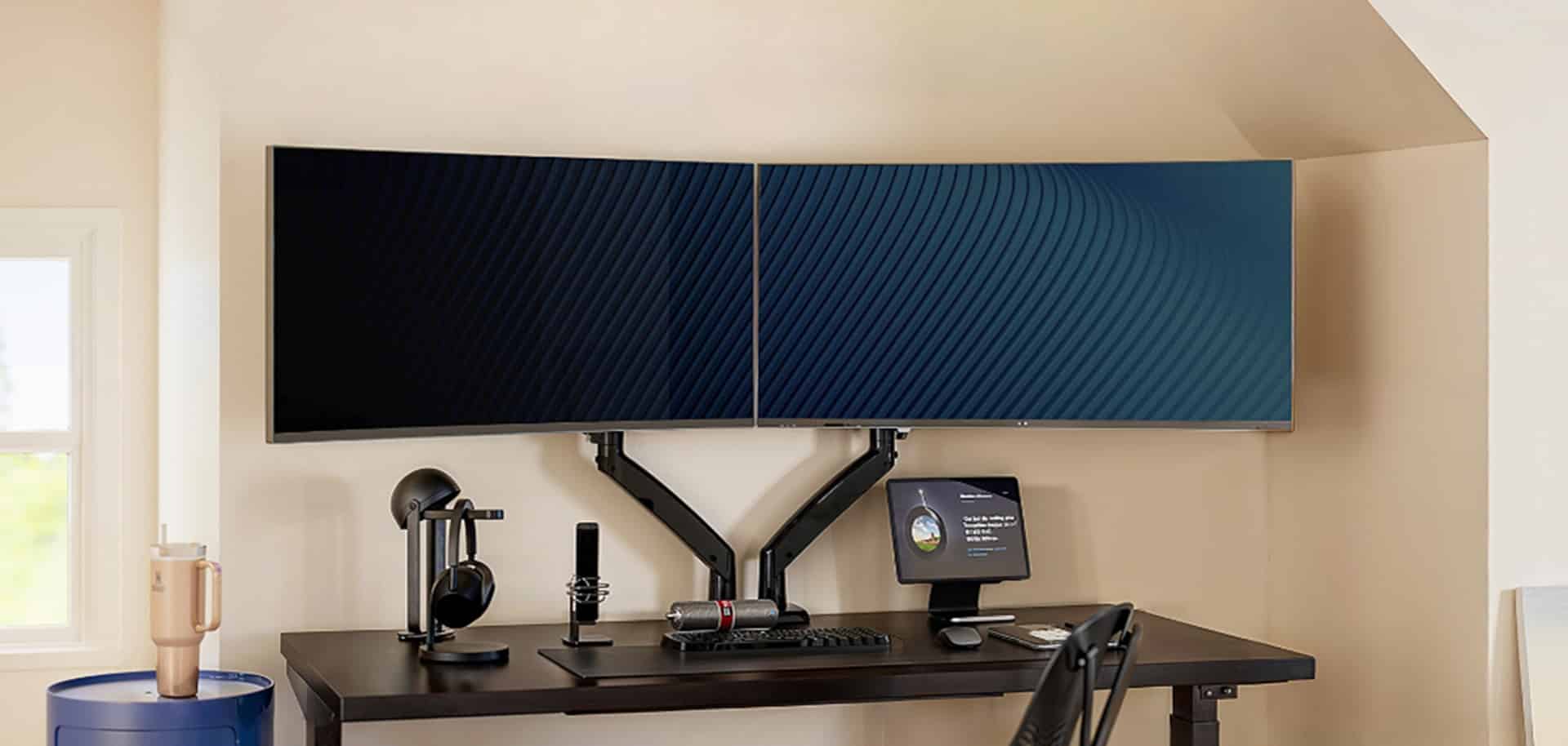
Desk space tends to disappear quickly once a second monitor is added, especially when one of the displays is a heavier curved panel. Huanuo’s DS7 Dual Monitor Arm is designed to address this problem head-on, offering a sturdy, flexible mounting solution for users looking to clean up their workspace and improve ergonomics.
MP1st had the opportunity to go hands-on with the DS7 for a review, using it in a real-world dual-monitor setup to evaluate build quality, adjustability, and everyday usability. Given the price and quality, I believe it is worth it, but I will let you be the judge.
Build Quality and Setup Experience

When you open the box, you will see that the monitor arm is neatly packaged and secured in place, and easy to remove. Upon removing each piece from the box, you can tell the base feels solid and that the materials appear to be high-grade aluminum. Everything fits together cleanly, and Huanuo includes hardware for both clamp and grommet mounting, supporting desks up to 3.5 inches thick. They also include instructions for setting up your mount, so be sure to check them out.
The setup process was straightforward from start to finish. From opening the box to adjusting both monitors, the entire install took less than an hour. The instructions were clear enough to follow without confusion (though you may not have needed it, as it was straightforward to put it all together), even when mounting two displays simultaneously. Once secured, the arm kept both monitors steady, including a decently heavy curved monitor that often highlights weaknesses in lesser mounts.
One small detail worth mentioning involves the cable management system. To fully hide the power and display cables for each monitor, the top section of each arm needs to be unscrewed. This applies only to the upper arm and requires little effort, but it is an extra step users should be aware of. Outside of that, the rest of the setup process was smooth. Though I want to note that it is a tight fit for cable management, so be aware.
With arms that extend up to 25 inches, the DS7 works well on deeper desks and wider layouts. That extra reach makes positioning easier and avoids the cramped feeling that some dual-monitor arms can create. Lifting the monitors completely off the desk also frees up valuable surface space almost immediately. Adjusting it took no effort at all for the monitors I have.

Everyday Comfort and Use

Once installed, the DS7 proves easy to live with. Height adjustments are smooth, with up to 21 inches of vertical movement available. Finding a comfortable viewing position takes only a few seconds, which makes a noticeable difference during long work or gaming sessions. Moving it is very easy. Make sure that in your initial setup, you tighten the bolt just enough to allow some fluidity in the arms’ movement and avoid stiffness.
Each arm supports a 90-degree swivel, an 85-degree tilt, and full 360-degree rotation. Adjusting may require loosening certain joints to move them (using the hex tool provided). Switching between landscape and portrait orientation is quick, and repositioning a screen to share content feels natural. The arms move smoothly without feeling loose, and once set, the monitors stay precisely where they are placed.
Despite supporting screens up to 40 inches and weighing up to 26 pounds each, the DS7 does not feel stiff or overbuilt. Even after multiple adjustments, the arms remain balanced and stable. This is especially important for mixed setups that include curved displays, where weight distribution can be uneven. So far, both my wife and I like it and feel that it has not interfered with our everyday workflow.
Features That Add Additional Value
One of the more practical additions is the built-in USB port. Having a USB connection integrated into the arm allows for either added convenience or a cleaner setup, depending on how it is used. It works well for charging devices or keeping frequently used accessories within easy reach without adding more visible cables.
Once the cable management is in place, the DS7 does a good job of keeping wires neat and out of sight. Combined with lifting the monitors off the desk, the result is a workspace that looks more organized and intentional.
Overall, Huanuo’s DS7 Dual Monitor Arm delivers on its core promises. It is sturdy, easy to install, simple to adjust, and capable of handling demanding monitor setups. At this price point, it is an insane value and one I highly recommend for those looking for a good dual-monitor arm for their setup.
Pros
- Durable and High Quality monitor arm
- Easily installation is quick and easy
- Will support heavy monitors

Cons
- Tight area on the upper arm for cable management
Huanuo’s DS7 High-Performance Dual Monitor Arm hardware was provided by the manufacturer. You can read MP1st’s review and scoring policy right here.
This website contains affiliate links. If you click a link and make a purchase, we may earn a commission at no additional cost to you. This helps support our work. Learn more on our affiliate page.